
AI dispatching automatically pairs the right technician with the right appointment in real time, using GPS location, live traffic, weather conditions, technician skill tags, and your business rules to make assignment decisions without manual intervention. For field-service teams running roofing, solar, HVAC, pest control, or door-to-door sales operations, it replaces the dispatcher's whiteboard with a system that adjusts continuously as conditions change.
The verdict: if your team handles recurring appointments, roaming reps, or frequent reschedules, AI dispatching is worth piloting now. Canvassingme users report a significant improvement in rep productivity within the first month and an average notable lift in close rates, with the platform supporting management of 10,000+ appointments. The system connects to GPS/telemetry feeds, calendar and CRM tools, and routing/traffic APIs, so it works within the operational stack you already run.
40% rep productivity improvement in month 1. 30% average close-rate lift. Management of thousands of appointments. These are the internal benchmarks Canvassingme field teams report after adopting AI-powered dispatch.
Table of Contents
- How does AI dispatching actually work?
- What business benefits and KPIs should you track?
- When is AI dispatching worth adopting for your operation?
- How do you evaluate vendors and build an implementation plan?
- What are the common pitfalls and how do you avoid them?
- Your 30–90 day rollout checklist
- Key Takeaways
- What field teams actually get wrong about AI dispatch
- Canvassingme gives field teams a direct path to AI dispatch
- Sources and further reading
How does AI dispatching actually work?
Automated dispatching integrates real-time GPS, live traffic feeds, weather data, and business constraints — technician skills, vehicle capacity, customer time windows — to automate assignment decisions and cut manual errors. The process follows a clear sequence:
- Data ingestion: The system pulls GPS positions, job metadata (service window, required skills, estimated duration), and live traffic conditions.
- Constraints engine: Business rules are applied — which technician is certified for this job type, which vehicle has the right equipment, what the customer's time window is.
- Optimization: The algorithm minimizes drive time, maximizes appointment capacity, and protects SLA commitments simultaneously.
- Task assignment: Jobs are pushed to technicians with turn-by-turn routing.
- Real-time reoptimization: When a tech is delayed or a customer reschedules, the system reoptimizes remaining assignments to preserve downstream commitments.
What makes AI dispatch different from a static routing tool is the continuous learning layer. Algorithms adapt to historical patterns in your own operational data over time, so the system gets more accurate as it accumulates your job records, service durations, and technician performance data.
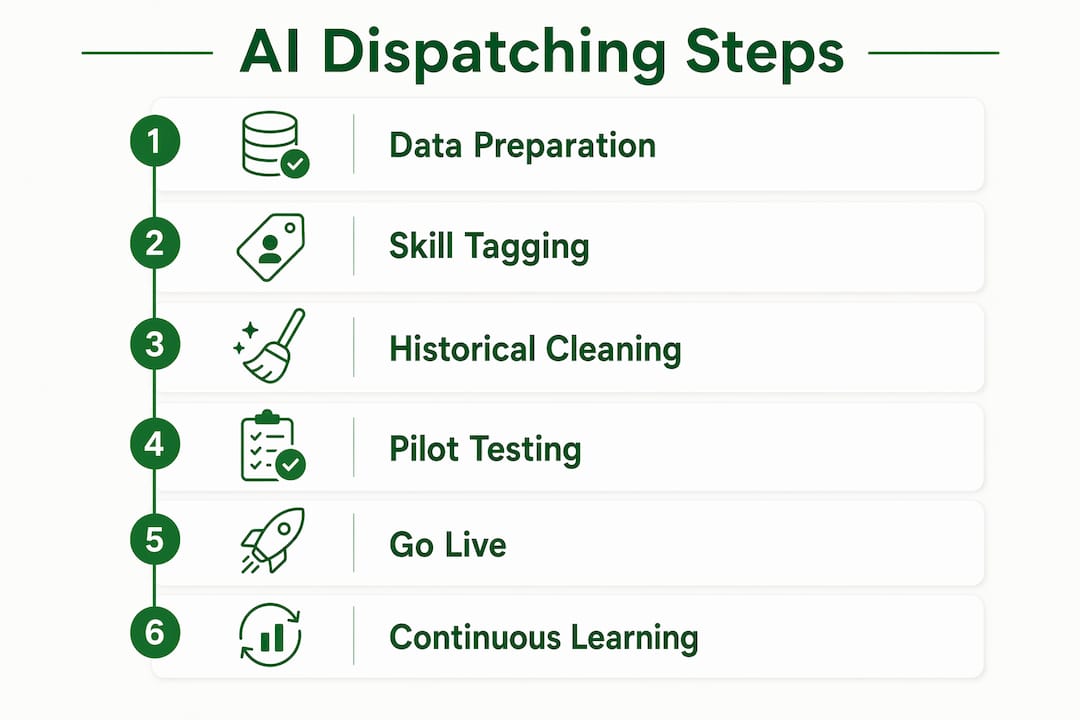
Pro Tip: Before going live, normalize your GPS timestamps, build a consistent skill-tag taxonomy, and clean historical service-time outliers. The system's intelligence is only as good as the data you feed it at the start.
What business benefits and KPIs should you track?
Automated dispatching reduces manual planner effort, increases workflow transparency, and improves resource utilization. The KPIs that move most visibly are:
- Rep productivity: More appointments completed per tech per day. Canvassingme teams see a 40% improvement in month 1.
- Close rate: Better-matched appointments and confirmed arrival windows lift first-visit conversion. The average improvement across Canvassingme users is 30% close-rate lift.
- Travel time per job: Optimized routing cuts drive minutes, which compounds across a full day.
- No-show and reschedule rate: Automated confirmation and reminders reduce no-shows before dispatch even runs.
- SLA adherence: Real-time reoptimization keeps commitments intact when disruptions occur.
Improvement timelines are predictable. Month 1 delivers the productivity and travel-time gains because the system immediately eliminates manual assignment errors. Months 3–6 show close-rate and SLA improvements as the algorithm learns your team's actual service patterns. Track average jobs per tech per day, travel minutes per job, no-show rate, and first-visit close rate as your baseline KPI set.
When is AI dispatching worth adopting for your operation?
Not every team needs full AI dispatch today. The clearest signals that you're ready:
- Techs cover large or overlapping territories with variable daily routes
- You handle more than 20–30 appointments per week across multiple reps
- Reschedules or no-shows regularly cascade into downstream delays
- Multi-skill jobs (e.g., solar installs requiring both an electrician and a roofer) require manual coordination
- Travel costs are a measurable line item in your operating budget
Industry fit by use case:
| Industry | Primary dispatch challenge | Where AI helps most |
|---|---|---|
| Roofing | Weather cancellations and rescheduling | Real-time reoptimization after weather delays |
| Solar | Multi-tech installs, permit windows | Skill-matching and sequential job coordination |
| HVAC | Emergency vs. scheduled mix | Priority-based assignment with SLA protection |
| Pest control | High-frequency recurring routes | Route density optimization and auto-confirmation |
| Door-to-door sales | Territory coverage and rep positioning | GPS-based territory assignment and rep routing |
Very small teams with fixed daily routes and minimal reschedule volume may not see enough ROI to justify the setup investment. For those operations, a structured appointment management workflow is often the right first step before moving to full AI dispatch.
How do you evaluate vendors and build an implementation plan?
Implementations require internal process changes and integration with core systems to realize benefits. Use this checklist when evaluating platforms:
Vendor evaluation checklist:
- GPS/telemetry integration (native or API)
- CRM and calendar sync (two-way, not read-only)
- Role-based access control for dispatchers, managers, and field reps
- Configurable business rules (skill tags, time windows, priority tiers)
- Raw data export and KPI reporting dashboards
- Onboarding SLA and support response time commitments
- Offline behavior when connectivity drops in the field
Pilot plan (30 days):
- Select a cohort of 5–10 reps in one territory
- Define three baseline KPIs before go-live (jobs/day, travel minutes, close rate)
- Run a two-week parallel period with manual and AI dispatch side by side
- Go live with AI dispatch for the cohort; keep a human override option active
- Review KPI delta at day 30 and set scale criteria
Simple ROI template: Multiply time saved per dispatcher per day by hourly cost, add incremental appointments booked per week by average job value, and subtract platform cost. A team of 10 reps saving 45 minutes of dispatcher time daily and booking two additional appointments per week typically clears a positive ROI within the first month.
Pro Tip: Insist on a short, instrumented pilot with daily KPI dashboards rather than a feature-checklist demo. A vendor confident in their product will agree to this; one who resists usually has a reason.

What are the common pitfalls and how do you avoid them?
Most AI dispatch projects that underperform share the same root causes:
- Poor data quality: Inconsistent GPS timestamps or missing skill tags produce bad assignments from day one. Clean this before launch, not after.
- Overly rigid rule sets: Rules that are too strict leave the optimizer with no good options and force constant manual overrides. Start conservative and loosen constraints as you gain confidence.
- Over-automation without override paths: Dispatchers need a clear, fast way to intervene. A system that doesn't support human override loses crew trust quickly.
- Change resistance: Field reps often distrust automated assignments initially. Involve team leads in the pilot design and share KPI results openly.
- No measurement guardrails: Without a baseline, you can't prove value. Set KPIs before go-live, not after.
Pro Tip: Keep a rollback plan for the first 2–4 weeks and run a decision log that records every manual override and the reason. That log becomes high-value training data for tuning constraints and improving the system's acceptance rate over time.
Your 30–90 day rollout checklist
| Week / Period | Milestone | Owner | KPI Check |
|---|---|---|---|
| Week 1 | Data audit: GPS logs, skill tags, service-time history | Operations manager | Data completeness rate |
| Week 2 | Integrations live: GPS, CRM, calendar | IT / platform admin | Integration test pass |
| Week 3 | Skill tagging complete; pilot cohort selected | Team leads | Tag coverage % |
| Week 4 | Parallel run begins; dispatcher override protocol documented | Dispatcher + manager | Override rate |
| Month 2 | Full pilot go-live; daily KPI dashboard active | Operations manager | Jobs/day, travel time |
| Month 3 | Scale decision review; second territory onboarded if KPIs met | Leadership | Close rate, SLA adherence |
Operational readiness items to complete before go-live: technician training on the app and override process, customer notification templates for automated confirmations, and a documented escalation path for dispatch failures.
Pro Tip: Start with a conservative scheduling objective: protect SLAs first, add incremental capacity second. This builds crew trust before you push the system toward maximum throughput.
Key Takeaways
AI dispatching delivers measurable productivity and close-rate improvements for field-service teams when data quality is solid, integrations are in place, and the pilot is instrumented from day one.
| Point | Details |
|---|---|
| Start with clean data | Normalize GPS logs and skill tags before launch; data quality determines result quality. |
| Month 1 gains are real | Canvassingme teams report 40% rep productivity improvement and 30% close-rate lift in early deployment. |
| Pilot before scaling | Run a 30-day instrumented pilot with a cohort of 5–10 reps and defined baseline KPIs. |
| Override paths matter | Keep human override active and log every intervention to improve constraint tuning over time. |
| Canvassingme as next step | Canvassingme's AI Dispatch Assistant supports 10,000+ appointments and connects GPS, CRM, and calendar in one platform. |
What field teams actually get wrong about AI dispatch
Most operations managers I work with expect AI dispatching to be a routing upgrade. It isn't. It's a decision layer that sits above routing, scheduling, and CRM data simultaneously, and its value compounds only when those underlying data sources are clean and connected.
The teams that see the fastest gains aren't necessarily the largest. They're the ones that invest two weeks in data preparation before go-live and treat the pilot as a measurement exercise, not a feature trial. The 40% productivity improvement Canvassingme reports in month 1 is real, but it assumes the system has accurate GPS positions, tagged technician skills, and a CRM feeding job metadata correctly.
The forward-looking reality is this: as you scale AI dispatching across territories, the algorithm's historical learning becomes a competitive asset. Teams that start collecting clean operational data now will have a material advantage in dispatch accuracy 12 months from now compared to teams that wait.
Canvassingme gives field teams a direct path to AI dispatch
Field teams in roofing, solar, HVAC, pest control, and door-to-door sales get a concrete productivity advantage with Canvassingme's AI Dispatch Assistant: 40% more rep productivity in month 1, a 30% average close-rate improvement, and the operational capacity to manage 10,000+ appointments without adding headcount.
The platform combines real-time GPS tracking, AI-powered appointment dispatch, CRM integration, and built-in team communication in one place. Onboarding is fast, the subscription model includes optional add-ons for AI dispatch and advanced analytics, and custom flat-rate plans are available for larger teams. You can schedule a new appointment directly or explore the full AI Dispatch Assistant to see how the platform fits your current operation.
Sources and further reading
- AI Dispatch Assistant — Canvassingme: Primary product page with reported user metrics and feature overview.
- Appointments — Canvassingme: Platform-level metrics on appointment volume and close-rate improvements.
- Transform your delivery operations with automated dispatching — Detrack: Covers real-time reoptimization and data input requirements.
- Automated Dispatching — Aluco: Explains continuous learning, resource utilization, and emissions benefits.
- Automated Dispatch Software: Complete 2025 Guide — Locus: Integration and change management requirements for implementations.